The short version
A useful portable supply.
A small reserve of energy.
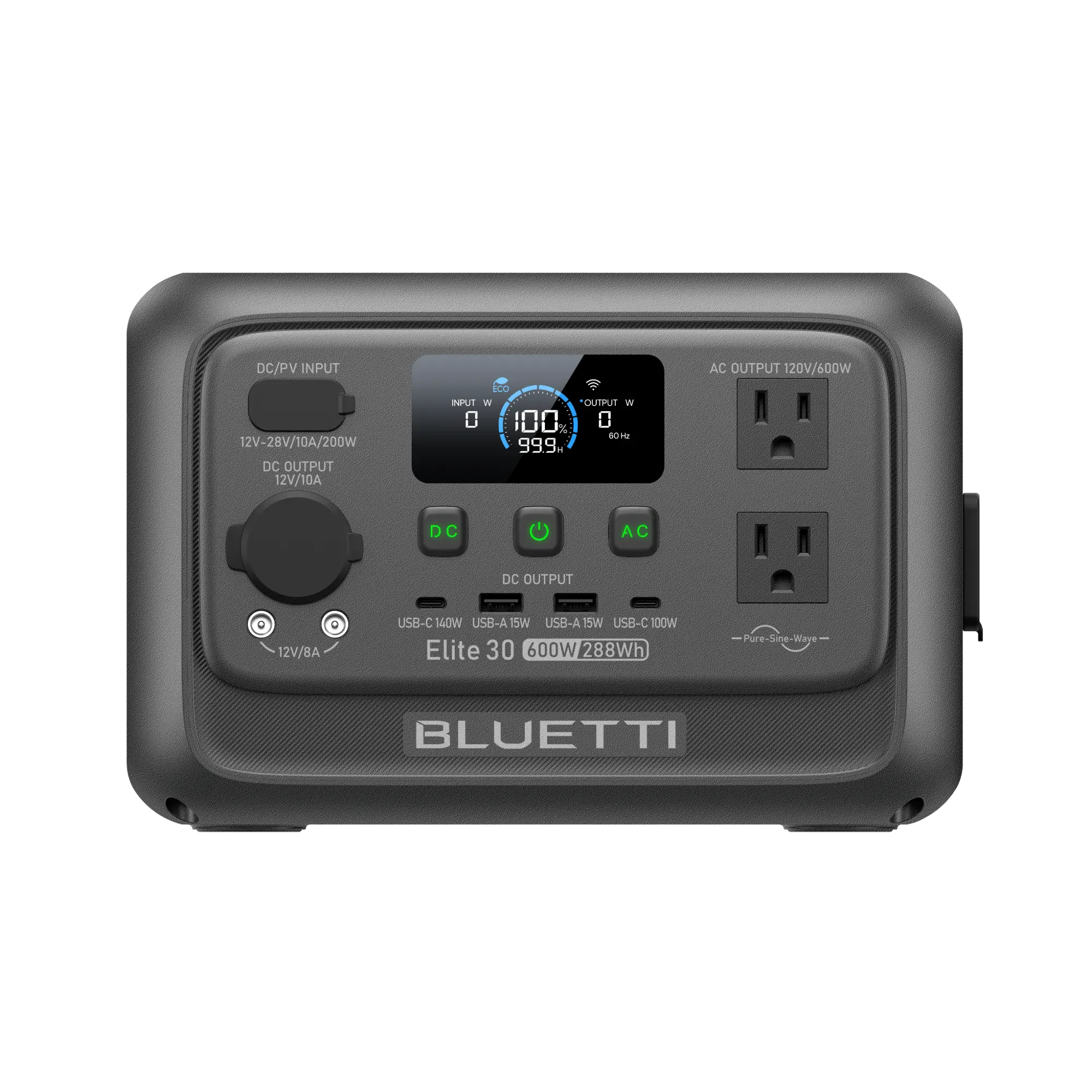
The strongest reason to choose the Elite 30 V2 is that it is easy to bring along. At about 9.5 pounds, it is much less cumbersome than a 1kWh or 2kWh station. Two AC outlets, two USB-C ports, and several DC connections make it useful for a mixed collection of small devices.
Choose it after adding up energy demand, not because the Power Lifting headline sounds like a large generator. A modest desk setup might run for a few hours; a high continuous load can empty the battery in a fraction of an hour. The station does not support direct battery expansion.
Editorial position: We assessed BLUETTI’s US documentation and published specifications. We have not bought, borrowed, or bench-tested this model, so this page does not assign a performance score or claim measured runtime, noise, or charging speed.
Reasons to consider it
- About 9.5 pounds with a compact carry handle.
- 600W rated output for compatible small appliances.
- 140W and 100W USB-C ports.
- Nine US output connections, with shared limits.
- UPS transfer specification of 10ms or less.
- LFP battery and a listed five-year warranty.
Tradeoffs to weigh
- Only 288Wh of nominal storage.
- No direct expansion-battery support.
- 1,500W Power Lifting applies to pure resistive loads.
- 200W solar input and a narrow 12–28V input window.
- Bypass capacity does not raise battery output.
- Above the FAA passenger-aircraft battery limit.
Sources: BLUETTI US product page, US user manual, and FAA battery guidance.
Know what you are buying
The important specifications.
| Battery capacity | 288Wh (18Ah) |
|---|---|
| Battery chemistry | LiFePO₄ (LFP) |
| Rated output | 600W total; 120V AC for the US model |
| Power Lifting | Pure resistive devices rated 600–1,500W; actual output remains 600W |
| USB-C | One 140W PD 3.1 port and one 100W port |
| DC / solar input | 200W maximum; 12–28V DC, 10A maximum |
| AC charging | 380W maximum in Turbo mode |
| AC + DC charging | 380W maximum combined |
| AC input with bypass | 980W maximum; separate from battery output |
| UPS transfer time | 10ms or less |
| Weight | Approximately 9.48 lb (4.3 kg) |
| Dimensions | 9.8 × 7 × 6.6 in (250 × 178 × 167.5 mm) |
| Cycle-life rating | 3,000+ cycles, according to BLUETTI |
| Warranty | Five years, according to the current US listing |
| Charging temperature | 32°F to 104°F (0°C to 40°C) |
Figures reference the US manual’s specification table and current product listing. Outlet layouts and specifications can differ by region.
Output and ports
Plan around 600W.
Check each connection.
The US model has two AC receptacles, two USB-A ports, a 100W USB-C port, a 140W USB-C port, one car outlet, and two DC5521 outputs. Nine connections do not mean nine independent power budgets: the manual specifies a 600W maximum for AC and DC output together.
The car outlet is rated 12V/10A. Each DC5521 port is rated 12V/5A, with an 8A combined limit for the pair. The car and DC5521 outputs are wired in parallel and share a 10A total ceiling.
USB-C charging speed depends on the connected device and cable. To use the full 140W rating, both need to support the appropriate USB PD profile; a high port rating cannot force an incompatible laptop to charge at that speed.
Operating limits and port ratings: US manual, sections 5.3 and 9.
Backup for electronics
Fast transfer. A finite backup window.
BLUETTI documents a UPS transfer time of 10ms or less. That may keep many electronics operating through a brief grid interruption, but whether a computer, NAS, or router tolerates the transfer depends on its own power supply and requirements.
The 980W figure is the manual’s maximum AC input with bypass. It is not a 980W battery-output rating, and it should not be interpreted as an allowance to add maximum charging power on top of a 980W bypass load. When the grid fails, attached loads must fit within the station’s 600W output limit.
The manual also says ECO modes can shut off outputs after a low-load period. Review those settings for small or important devices rather than relying on factory defaults.
Refilling the battery
Quick wall charging.
Careful solar matching.
Turbo mode accepts up to 380W and is documented to reach 80% in 45 minutes at 77°F. BLUETTI’s product page lists about 70 minutes for a full AC charge. Standard and Silent modes trade charging speed for other operating preferences.
| Mode | Maximum AC input | Documented AC time |
|---|---|---|
| Standard | 200W | About 2 hours |
| Turbo | 380W | 80% in 45 minutes |
| Silent | 200W | About 3 hours |
Manufacturer estimates, not speeds we measured. Temperature, battery state, settings, and available supply affect charging power.
Solar input is limited to 200W, 12–28V, and 10A. Check panel open-circuit voltage—including its increase in cold conditions—before connecting an array. Adding more nominal panel watts may help reach the input ceiling in imperfect sunlight, but only within BLUETTI’s permitted electrical configuration; wattage alone is not a compatibility check.
Car charging and compatible vehicle chargers are additional options, but their speed depends on the source and connection. Charging from a B80 in Power Bank Mode is supported by BLUETTI; it is an external charging source rather than direct battery expansion.
Illustrative, not measured
Estimate your load.
See the battery’s limits.
The examples below use BLUETTI’s published planning formula: 95% depth of discharge, 90% inverter efficiency, and 9W of station self-consumption. Each calculation assumes a steady AC load and a full battery.
| Average AC load | Calculated runtime |
|---|---|
| 10W | 13.0 hours |
| 20W | 8.5 hours |
| 60W | 3.6 hours |
| 100W | 2.3 hours |
| 300W | 0.8 hours |
| 600W | 0.4 hours |
Formula: 288 × 0.95 × 0.90 ÷ (load watts + 9). Reference: BLUETTI’s Elite 30 V2 runtime guide. Temperature, age, changing loads, output settings, and overhead change the result. This is not a separate USB/DC runtime model.
Measure a refrigerator or CPAP over a representative period; cycling, heaters, and humidification can change average consumption substantially. This battery is too small to promise lengthy refrigerator backup or a full CPAP night from a generic wattage range.
BLUETTI advertises standby consumption as low as 4.5W under certain operating conditions. That is a different figure from the 9W used in its runtime formula, and it does not imply that outputs can be left active for weeks without draining a 288Wh battery.
When to size up
Portability or more stored energy?
| Model | Capacity | Rated AC output | Weight |
|---|---|---|---|
| Elite 30 V2 | 288Wh | 600W | About 9.5 lb |
| AC70 | 768Wh | 1,000W | About 22.5 lb |
| Elite 100 V2 | 1,024Wh | 1,800W | About 25.3 lb |
The AC70 stores about 2.7 times as much nominal energy, but weighs more than twice as much. The Elite 100 V2 moves into the 1kWh class. Those differences matter more for long runtime than the Elite 30 V2’s Power Lifting number.
Sources: AC70 US specifications and Elite 100 V2 US product page and manual. Confirm current availability for the exact model and bundle.
Need a 2kWh station? Read the Elite 200 V2 review →Before ordering
Compare the complete offer.
Confirm the full Elite 30 V2 model name and US outlet specification. Compare the station-only offer with panel bundles, including the charging cables and any items that ship separately. Check delivery, return, and warranty terms for your chosen package.
Our shopping link opens BLUETTI’s store. Select the Elite 30 V2 there and verify the current offer; we do not print a sale price that may change.
Browse BLUETTI Affiliate link · Opens the BLUETTI storeQuestions answered
Elite 30 V2 FAQ.
Can I add an expansion battery later?
No direct battery expansion is supported. BLUETTI says a B80 can charge it in Power Bank Mode; that does not turn the B80 into an integrated expansion battery or raise the station’s output rating.
Is the 1,500W Power Lifting figure a surge rating?
No. The manual describes support for appropriate pure resistive devices rated 600–1,500W, while actual output remains 600W. It does not guarantee motor or compressor startup.
Does 980W bypass mean 980W during an outage?
No. The 980W figure refers to maximum AC input with bypass. Battery operation is limited to 600W total. A load that works from grid power through bypass may still exceed the station’s limit when the grid fails.
Will the UPS keep my computer running?
It may, but a transfer specification alone cannot guarantee compatibility. Check the computer’s power supply requirements, total connected demand, ECO settings, and required shutdown time. Verify the setup with a controlled test before relying on it.
Can I take it on a passenger flight?
At 288Wh, it exceeds the FAA’s 160Wh ceiling for ordinary passenger lithium batteries and power stations. It is not permitted in carry-on or checked passenger baggage. See current FAA guidance and your airline’s rules.
Does 3,000+ cycles guarantee ten years?
No. The cycle figure is a manufacturer battery rating, not a guaranteed calendar lifespan. Usage, temperature, storage, charge rate, and discharge patterns affect aging. Follow the manual’s storage instructions.
Is it waterproof or silent?
No. The manual lists IP20, so keep it dry. BLUETTI advertises noise below 30dB under light loads, which is a condition-specific manufacturer claim. Fan behavior can change with load and charging; we have not measured it.
Sources and review method.
We checked BLUETTI’s US documentation and FAA guidance on September 16, 2026. Specifications and manufacturer claims are distinguished from our editorial assessment. The runtime table and calculator show calculations, not measured performance or customer experiences.
- Elite 30 V2 US product page — features, warranty, compatibility FAQ, and official imagery.
- Elite 30 V2 US user manual — port limits, charging modes, Power Lifting, and specifications.
- BLUETTI runtime guide — the planning formula used here.
- FAA airline passenger battery guidance — passenger-aircraft battery limits.